Existing vs As-Built Surveys – What’s the Difference?
128 City Rd, EC1V 2NX
+44 20 4615 4666
hello@linesurveying.uk
Laurel Hardwicke
February 20, 2026
Point cloud data has become an essential part of modern surveying and design workflows. By capturing millions of precise data points with a 3D laser scanner, surveyors create highly accurate digital representations of existing buildings. However, many designers are unsure how to use this data effectively in AutoCAD and Revit.
When used correctly, point cloud data improves accuracy, reduces repeat site visits and strengthens coordination between consultants.
Point cloud data is generated through 3D laser scanning technology. The scanner records millions of points in three dimensional space, creating a detailed digital model of the existing structure.
Surveyors typically deliver this data in formats such as E57, RCP or RCS. Once processed and registered, the files can be imported directly into AutoCAD or Revit for modelling and drawing production.
Because the dataset reflects real world conditions, designers work from accurate existing geometry rather than assumptions.
AutoCAD allows users to attach point cloud data directly into a drawing.
To begin, use the Attach function and select the RCP or RCS file. After inserting the file, position it using known coordinates or established survey control points.
Once aligned correctly, you can adjust display settings, manage point density and clip unnecessary areas. For example, section boxes and clipping tools allow you to isolate specific floors, façades or structural elements.
Designers can then trace over the point cloud to produce accurate 2D drawings, including floor plans, elevations and sections.
Revit offers deeper integration, particularly for Building Information Modelling workflows.
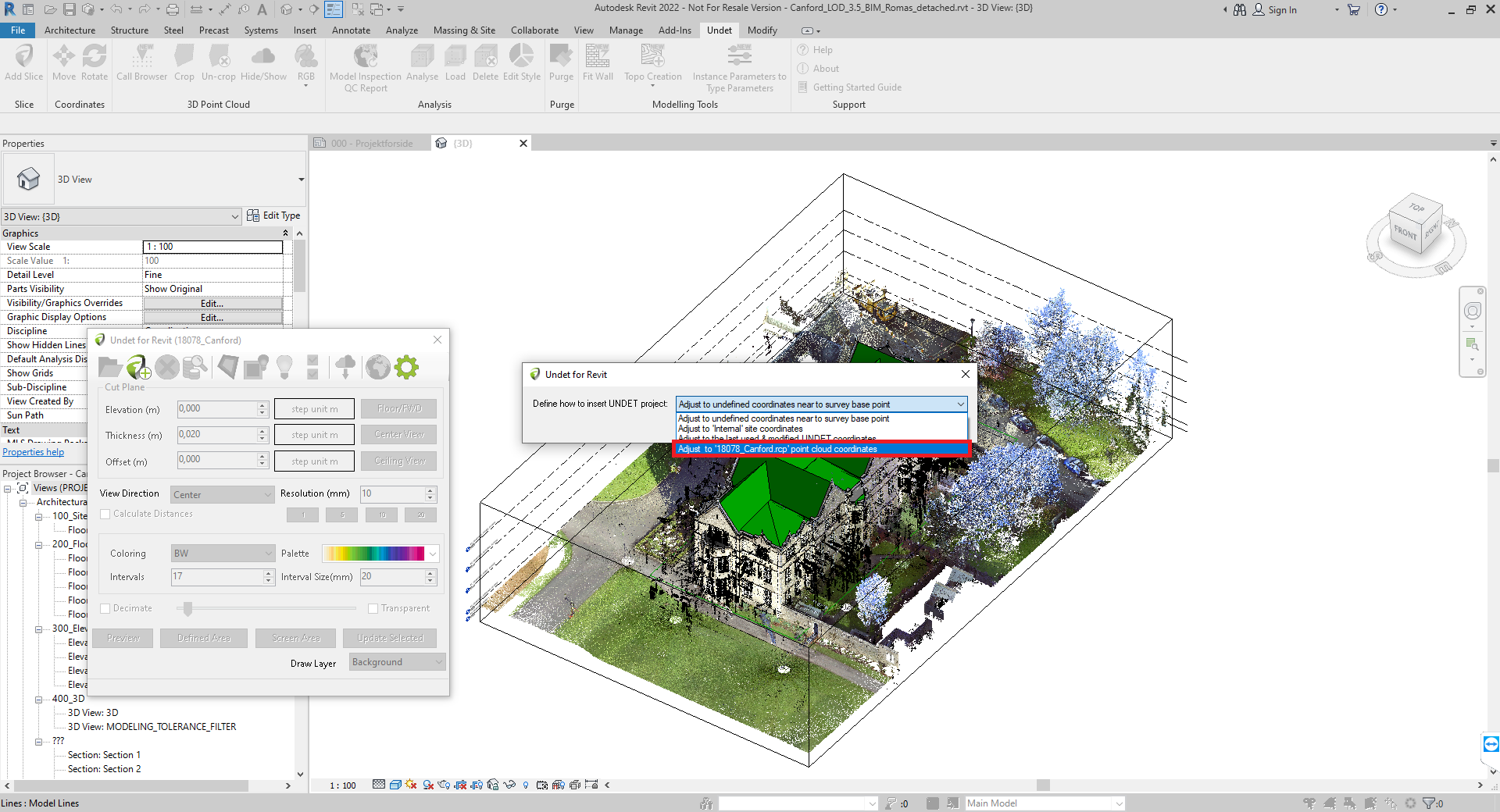
To insert the data, choose the Link Point Cloud option and select the relevant file. After linking the dataset, align it using shared coordinates or known survey points.
Once positioned correctly, you can:
Create levels based on existing floor heights
Model walls directly over scanned geometry
Place structural elements accurately
Extract reliable dimensions
Because Revit allows modelling directly within the point cloud environment, users gain a clear understanding of spatial relationships and existing conditions.
Although point cloud data is highly accurate, following a structured workflow is essential.
Firstly, confirm coordinate alignment before starting any modelling. Even small alignment errors can cause significant downstream issues.
Secondly, use clipping and section boxes to focus on manageable areas. Working with the entire dataset at once may slow performance and make interpretation difficult.
In addition, adjust point density settings to reduce visual clutter. This helps identify structural edges and key features more clearly.
Finally, combine point cloud data with traditional survey drawings where necessary. Doing so ensures clarity for contractors and team members who may not work directly from scan files.
Point cloud data supports a wide range of project types.
In refurbishment schemes, it captures irregular geometry accurately. Within heritage buildings, it records complex architectural details without physical contact. During structural alterations, it ensures new elements align precisely with existing conditions.
As a result, design conflicts reduce and coordination improves significantly.
Working with point cloud data offers several advantages.
Dimensional accuracy improves significantly
Repeat site visits reduce
Consultant coordination becomes easier
Refurbishment modelling becomes more reliable
Existing conditions remain visually accessible
Consequently, projects progress with fewer unexpected issues.
Point cloud datasets are often large and require capable hardware for smooth performance.
In addition, interpreting scan data requires experience. Not every visible point represents a structural edge, so understanding context is important for accurate modelling.
However, with proper workflow and suitable equipment, these challenges become manageable.
The effectiveness of any point cloud model depends on the quality of the original survey. High accuracy laser scanning ensures that the dataset reflects true site conditions.
At Line Surveying UK, we provide accurately registered and processed point cloud data ready for use in AutoCAD and Revit. Our deliverables integrate seamlessly into architectural and engineering workflows.
Point clouds are typically referenced rather than edited. Designers trace and model over the data instead of modifying the raw scan.
Revit offers stronger integration for 3D modelling, while AutoCAD remains highly effective for producing 2D drawings from scan data.
RCP or RCS formats are generally preferred for Autodesk workflows. E57 files can also be converted if required.
If you are planning a refurbishment or heritage project and require accurate survey data, point cloud modelling can improve efficiency and coordination.
Contact Line Surveying UK to discuss your requirements and receive point cloud data ready for AutoCAD or Revit integration.
We use cookies to improve your experience on our site. By using our site, you consent to cookies.
Manage your cookie preferences below:
Essential cookies enable basic functions and are necessary for the proper function of the website.
These cookies are needed for adding comments on this website.
Statistics cookies collect information anonymously. This information helps us understand how visitors use our website.
Google Analytics is a powerful tool that tracks and analyzes website traffic for informed marketing decisions.
Service URL: policies.google.com (opens in a new window)
You can find more information in our Cookie Policy and .